Every local business owner needs to claim Google Business Profile — and most have no idea how simple the process actually is. Your Google Business Profile controls how your business appears in Google Search and Google Maps. Furthermore, it is completely free to set up and takes less than 5 minutes to claim. Therefore, if you have not claimed yours yet, you are handing customers directly to your competitors every single day.
Moreover, businesses with a complete Google Business Profile receive up to 7 times more clicks than businesses without one. Consequently, claiming and optimizing your profile is the single highest-return action any local business owner can take right now.
Why You Must Claim Google Business Profile Before Anything Else
Google Business Profile is the foundation of every local SEO strategy. Furthermore, it directly determines whether your business appears in Google Maps, the Google Local Pack, and local search results — the three most valuable discovery channels for any local business.
When a customer searches for your type of business nearby, Google pulls its information from Business Profiles first. Specifically, businesses with claimed and complete profiles consistently rank higher than those with unclaimed or incomplete listings. Therefore, claiming your profile is not optional — it is the very first step in making your business visible online.
Additionally, as explained in what local SEO is and how it works, your Google Business Profile directly influences all three of Google’s local ranking factors — relevance, distance, and prominence. Consequently, no other single action produces more immediate local search impact than claiming and completing this profile.
Step 1 — Go to Google Business Profile
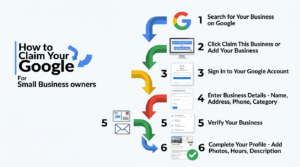
Open your browser and go to business.google.com. Furthermore, make sure you are signed into the Google account you want to use for your business. Click the “Manage now” button to get started.
If you do not have a Google account yet, create one first at google.com. Use a professional email address that represents your business — not a personal Gmail account. Moreover, keep the login details safe because you will use this account to manage your profile permanently.
Step 2 — Search for Your Business Name
Type your business name into the search field. Google will search its database to check whether a profile already exists for your business. Furthermore, if someone has already created a profile for your business — which happens frequently — you will see it appear in the results.
If your business appears in the results, click on it and select “Claim this business.” Consequently, Google will walk you through the verification process to confirm you are the legitimate owner. If your business does not appear, click “Add your business to Google” and proceed to create a new profile from scratch.
Step 3 — Enter Your Business Information
This step is where most business owners make critical mistakes. Furthermore, the information you enter here must match perfectly with every other platform where your business appears online — including directories, your website, and social media profiles.
Specifically, enter your exact business name as it appears everywhere else. Add your complete address including suite number and zip code. Enter your primary phone number — the same one you use on every other platform. Add your website URL. Furthermore, choose the most specific business category that accurately describes your primary service.
As covered in detail about why NAP consistency matters for local rankings, inconsistent information across platforms directly damages your Google rankings. Therefore, take extra care to enter every detail accurately and consistently from the very beginning.
Step 4 — Verify Your Business
Google requires verification to confirm you actually own or manage the business. Moreover, this step protects businesses from having their listings hijacked by competitors or bad actors. Therefore, complete the verification process as quickly as possible after claiming your profile.
Google offers several verification methods depending on your business type. The most common method is postcard verification — Google mails a postcard with a verification code to your business address. This typically takes 5 to 14 days. Furthermore, some businesses qualify for phone or email verification, which completes instantly.
Additionally, some business categories qualify for instant verification if you already have a verified Google Search Console account for your website. Consequently, if you manage your website through Google Search Console, check whether instant verification is available for your business type before waiting for a postcard.
Step 5 — Complete Every Field of Your Profile
Claiming your profile is only the beginning. Furthermore, a half-completed profile performs almost as poorly as no profile at all in local search results. Therefore, spend 15 to 20 minutes completing every available field immediately after verification.
Specifically, add your business description — write 150 to 200 words mentioning your main services, your city, and the types of customers you serve. Set your operating hours accurately for every day of the week. Add your service area if you serve customers at their location. Furthermore, add at least 10 high-quality photos including your storefront, interior, products or services, and team members.
As shown in the ultimate business listing checklist, businesses that complete every available field consistently outrank those with incomplete profiles — regardless of how long they have been in business. Consequently, completeness directly translates into higher rankings and more customer enquiries every single week.
Step 6 — Start Collecting Reviews Immediately
Once your Google Business Profile is live and verified, start collecting customer reviews right away. Reviews are one of the most powerful signals Google uses to rank businesses in local search results. Moreover, a business with 20 genuine positive reviews consistently outranks a business with zero reviews — even when everything else is equal.
Ask every satisfied customer for a review and send them a direct link to your Google review page. Keep the request simple and genuine. Furthermore, respond to every review that comes in — both positive and negative. As covered in how to get 5-star reviews that bring more customers, active review management directly boosts your Google Business Profile ranking over time.
Step 7 — Pair Your Profile With Business Directory Listings
Your Google Business Profile becomes significantly more powerful when you combine it with listings on multiple business directories. Furthermore, each directory listing creates a citation that strengthens your Google ranking signals — making your Business Profile perform better as a direct result.
Start by creating your free listing on ListYourBusiness.us — a dedicated USA business directory that builds strong local citations for businesses across every industry. Additionally, work through the 10 best business listing sites in 2026 and get your business listed across every relevant platform as quickly as possible.
Consequently, businesses that combine a complete Google Business Profile with listings across multiple directories consistently dominate local search results — outranking competitors who rely on Google alone. Therefore, claiming your profile is just the first step. Building your full online presence across multiple platforms is what produces lasting local search dominance.
Claim Your Google Business Profile Today
Every day your Google Business Profile stays unclaimed is another day your competitors capture the customers searching for your business online. Furthermore, the process takes less than 5 minutes and costs absolutely nothing — making it the most valuable free action any local business owner can take right now.
Therefore, go to business.google.com right now. Claim your profile. Complete every field. Start collecting reviews. Moreover, combine your profile with a free listing on ListYourBusiness.us to maximize your local search visibility from day one.
Consequently, within weeks of completing these steps, your business will start appearing in front of local customers who are actively searching for exactly what you offer — without spending a single dollar on advertising.