How to Rank Your Business in Google Maps in 2026 (Free Step-by-Step Guide)
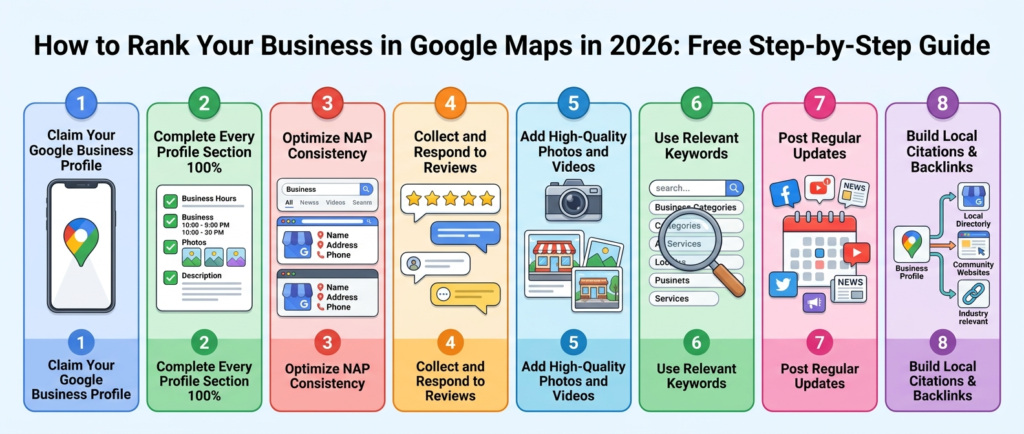
To rank in Google Maps 2026, you need more than just a Google Business Profile. Most local businesses create a basic listing and wonder why they never appear in the top results. The businesses showing up at the top of Google Maps right now follow a specific set of strategies — and none of them require a big budget. Therefore, this guide covers every step you need to rank in Google Maps in 2026 — completely free.
Moreover, Google Maps visibility is one of the most valuable forms of online exposure any local business can have. Consequently, customers searching on Google Maps are ready to visit and spend money — making this traffic far more valuable than most other online channels.
Why Ranking in Google Maps in 2026 Matters More Than Ever
Google Maps is no longer just a navigation tool. Furthermore, it is now one of the most powerful local business discovery platforms in the world. Over 60% of all local searches now include a Google Maps result — and customers click on map listings before they click on anything else on the page.
Think about what happens when someone searches “dentist near me” or “best cafe in [city].” Google immediately shows a map with three business listings at the top. Specifically, these three listings — called the Local Pack — receive the majority of clicks from that search. Therefore, if your business appears in that Local Pack, your phone rings. If it does not, customers call your competitor instead.
As explained in the ultimate local SEO guide for small businesses, Google Maps rankings directly impact foot traffic, phone calls, and website visits for every local business. Furthermore, improving your Maps ranking costs nothing — it only requires consistent effort and the right strategy.
Step 1 — Claim and Complete Your Google Business Profile
The foundation of every Google Maps ranking strategy is a complete Google Business Profile. Moreover, this is the single most important step you can take — and it costs absolutely nothing to do.
Go to Google Business Profile and claim your listing immediately. Fill out every single field without skipping anything. Add your business name exactly as it appears everywhere else. Include your complete address, your phone number, your website URL, your business category, and your operating hours for every day of the week.
Furthermore, add at least 10 high-quality photos of your business, your products, and your team. Google actively rewards listings with more photos by showing them higher in Maps results. Consequently, every photo you add strengthens your ranking position directly.
Step 2 — Build Citations to Rank in Google Maps 2026
Citations are mentions of your business name, address, and phone number across the web. Furthermore, they are one of the most powerful ranking signals Google uses to determine your Maps position. The more consistent citations you have, the higher Google ranks your business in Maps results.
Every business directory listing you create builds a new citation. Therefore, getting listed across multiple reputable directories is one of the fastest ways to improve your Google Maps ranking. Start by adding your free listing to ListYourBusiness.us — a dedicated USA business directory that builds strong local citations for businesses across every industry.
Additionally, work through the 10 best business listing sites in 2026 and create your listing on every relevant platform. Moreover, make sure your business name, address, and phone number match perfectly across every single listing. As covered in why NAP consistency matters, even one inconsistency reduces your Maps ranking directly.
Step 3 — Collect Reviews Consistently
Reviews are a direct ranking factor in Google Maps. Specifically, Google’s local algorithm gives significant weight to both the number of reviews and the average star rating when deciding which businesses appear at the top of Maps results.
Ask every satisfied customer for a review immediately after their visit or purchase. Send a direct link to your Google Business Profile review page — removing all friction from the process. Furthermore, respond to every review professionally and promptly. Google tracks review response rates and rewards businesses that engage actively with their customers.
Moreover, diversify your review collection beyond Google alone. Reviews on directories like ListYourBusiness.us and other platforms build your overall online reputation — which feeds back into your Google Maps ranking over time. As shown in how listing your business drives real growth, consistent review collection is one of the most reliable paths to a higher Maps position.
Step 4 — Choose the Right Business Category
Your business category tells Google exactly what type of business you run — and it directly determines which searches your Maps listing appears for. Furthermore, choosing the wrong category is one of the most common reasons businesses fail to rank in Google Maps despite doing everything else correctly.
Choose the most specific category that accurately describes your primary business. For example, a business offering physiotherapy services should select “Physiotherapist” rather than the broader “Health” category. Consequently, a more specific category matches your listing with more relevant customer searches — which improves both your ranking and your conversion rate simultaneously.
Additionally, Google Business Profile allows you to add secondary categories. Use every relevant secondary category available to maximize the range of searches your listing appears for in Google Maps results.
Step 5 — Add Keywords Naturally to Your Business Description
Your Google Business Profile description gives you a powerful opportunity to include the keywords your customers search for. Moreover, Google reads your description carefully and uses it to match your listing with relevant local searches.
Write a clear, compelling description that mentions your main services, your location, and the types of customers you serve. Include your primary keywords naturally — never stuff keywords awkwardly into sentences. Furthermore, mention your city and neighborhood specifically to strengthen your local relevance signals for Google Maps.
The local SEO guide for small businesses covers keyword optimization for local listings in full detail. Therefore, follow its recommendations to ensure your description works as hard as possible for your Maps ranking every single day.
Step 6 — Post Regular Updates to Your Google Business Profile
Most businesses never use the Google Posts feature — which creates a significant ranking opportunity for those who do. Furthermore, Google actively rewards businesses that post regular updates by showing their listings more prominently in Maps results.
Post weekly updates about new products, special offers, upcoming events, or helpful tips for your customers. Keep each post short, clear, and relevant to your local audience. Consequently, this consistent activity signals to Google that your business is active, engaged, and worth showing to customers searching nearby.
Moreover, fresh content on your profile also keeps existing customers engaged and gives potential customers additional reasons to choose your business over a competitor with a static, outdated listing.
Step 7 — Build Local Backlinks and Mentions
Local backlinks — links from other local websites pointing to your business — strengthen your Google Maps ranking significantly. Furthermore, mentions of your business on local news sites, community blogs, and local business associations send powerful relevance signals to Google.
Reach out to local organizations, community groups, and complementary businesses about cross-promotion opportunities. Additionally, sponsor local events or contribute to local publications in exchange for a mention and link back to your website. As covered in the 10 benefits of online business directories, every quality link and mention builds the local authority that Google Maps rewards with higher rankings.
Start Climbing Google Maps Rankings Today
Ranking in Google Maps in 2026 does not require an advertising budget. It requires consistency, completeness, and the right strategy applied systematically over time. Furthermore, every step in this guide is completely free — and each one compounds on the previous step to produce stronger results every single month.
Therefore, start today. Claim your Google Business Profile. Create your free listing on ListYourBusiness.us. Build citations across multiple directories. Collect reviews from every happy customer. Moreover, keep your information accurate, your photos fresh, and your posts regular.
Consequently, within 30 to 60 days of implementing every step in this guide, your business will start climbing Google Maps rankings — bringing more local customers through your door every single week without spending a single dollar on adver